
Your cart (0)
Your cart is empty
Tax included and shipping calculated at checkout
Your cart is empty
Tax included and shipping calculated at checkout

Last Updated: October 9, 2026
Advanced electric mountain bike diagnostics means tracing a fault through the battery, wiring, controller, motor and display in a set order, so you find the cause instead of guessing.
Write down what the bike does and when: assist mode, terrain, battery level, and whether the fault clears on its own. Intermittent faults are hardest to pin down, vibration and load are common triggers.
Check the bike as a machine first, a surprising number of "electrical" faults are mechanical. Confirm the battery is seated and latched, cables aren't pinched, motor bolts and speed sensor gap are correct, and cranks and wheels spin freely.
A pack can show full charge and still sag under load. Inspect terminals for corrosion, moisture or scorching, check the charge port and discharge contacts, and look for swelling or casing damage. If it cuts out only under full power, the battery or its connections are prime suspects.
Trace the loom from battery to controller to motor, looking for chafing at tight bends. Inspect each connector for water, grit or bent pins, check the inline fuse if fitted (correct rating only), and look for rubbed-through cable near the motor or bottom bracket.
Controller testing needs a multimeter and, on most modern systems, the manufacturer's diagnostic software. Without them you can only confirm battery voltage reaches the controller, that it powers on with the display, and note any error codes.
Sometimes the "fault" is a setting, confirm assist mode, wheel size and speed limit are correct, as a wrong wheel size throws off speed readings and can trigger error messages. Note display error codes exactly and check the display cable at both ends.
Manufacturer diagnostic software reads fault codes and live sensor data a multimeter cannot, though availability varies between brands and some systems lock this to dealers. Use the correct connection, and record fault codes and live data before clearing anything.
Firmware updates can fix known bugs and improve sensor behaviour, but only update through the manufacturer's official app or tool and never interrupt an update partway. Firmware will not fix a loose connector. Consistent electrical health also requires that you properly maintain lithium batteries to ensure the long-term stability of your bike's power delivery system.
After any fix, retest under the conditions that triggered the fault, a repair that only works on the stand is not finished. Note what you changed so future diagnosis is faster.
Some faults need dealer-level tools, model-specific knowledge or safe battery handling. If the basics check out and the fault persists, get it looked at.
Avinox DP100 Control Display →
E-bike error codes are the system's own report of what it thinks is wrong, and the fastest starting point for diagnosis. Read the code first, then match it against your recorded symptoms, a code tells you where to look, not always what to replace.
A fault code alone can send you down the wrong path, the same code can have more than one cause, and the symptom narrows it down.
Model-specific limits matter: some systems report detailed sub-codes, others a single generic code, and meanings differ between brands and model years.
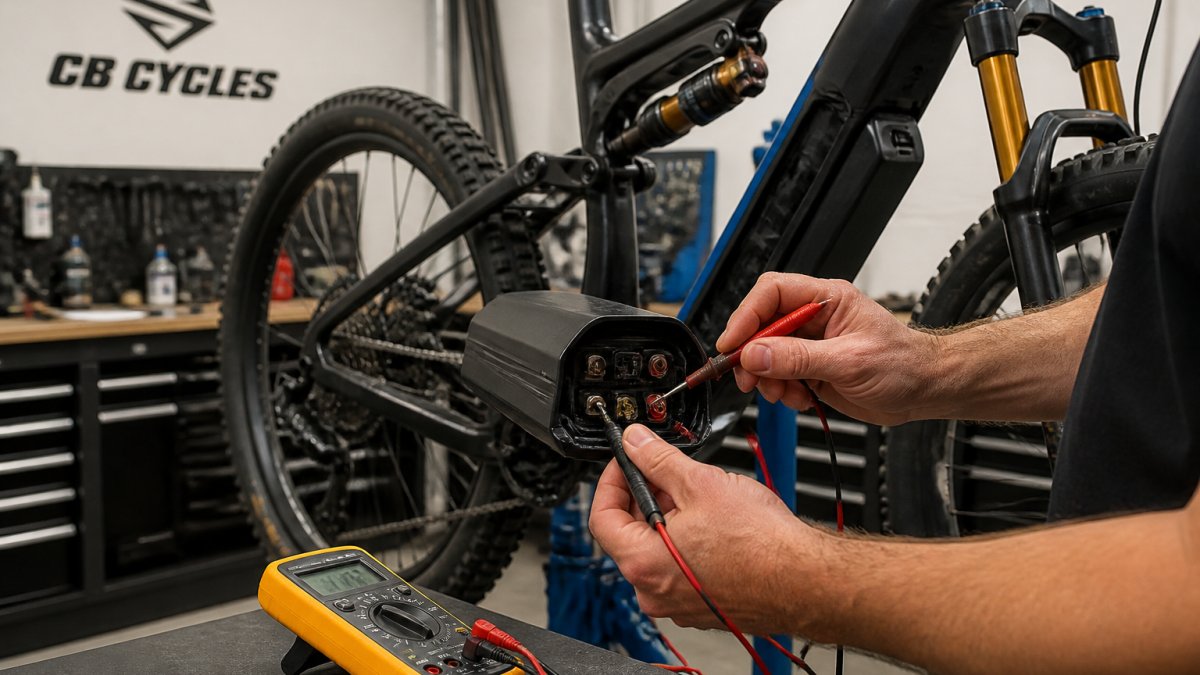
E-bike battery troubleshooting starts with connections and load behaviour, not just charge level. E-bike diagnostic software then fills in the detail by reading live data and stored fault codes a multimeter cannot show.
| Check | What to Look For | Likely Cause if It Fails |
|---|---|---|
| Charge level | Reads full but sags under load | Ageing cells or a tired pack |
| Terminals | Corrosion, moisture, scorching | Poor contact or water ingress |
| Voltage under load | Big drop when you demand power | Battery or connection fault |
Charge percentage tells you how much energy the pack reports, not how well it delivers it. Watch for voltage sag when you climb hard, note if range has dropped noticeably, and check for swelling, damage or unusual heat after charging.
Diagnostic software is only as good as the data you feed it.
If you are chasing an Avinox fault and want the system checked properly, our workshop handles Avinox diagnostics and stocks genuine Avinox Spare Parts, including the Avinox DP100 Control Display, the Avinox DPC100 Control Display, the Avinox Wireless Controller (Right) and the Avinox Control Main Display Cable (500mm).


Electrical faults on a modern e-MTB rarely fix themselves, and guessing at parts gets expensive fast. If your bike is throwing codes, cutting out under load or losing assistance, bring it in.
Start with a structured workflow: note the symptoms, check the display for e-bike error codes, inspect the battery connections and inline fuse, then test the motor and controller. Many faults show up as intermittent issues under trail conditions, so replicate the ride where possible. If codes point to the motor or battery and basic checks don't resolve it, book a workshop service for advanced electric mountain bike diagnostics.
Yes, to a point. You can read error codes on the display, check battery voltage with a multimeter, inspect wiring and connectors, and test the Hall sensor. However, e-bike diagnostic software is needed for firmware updates, detailed fault logs, and model-specific parameters. Some systems like Avinox have limited third-party tool support, so a workshop with the right software and genuine parts is often the practical next step.
The most common issues are battery connection faults, worn or damaged wiring, and sensor problems that cause intermittent power delivery. Firmware glitches also appear regularly. Many of these show up as e-bike motor fault symptoms like surging, cutting out, or reduced assist. Regular e-bike battery troubleshooting and system checks help catch these before they leave you stranded on the trail.